PDF Reader Lite - Fast Viewer
- 4.0
- Rating
- 100.00K
- Installs
- Free
- Price
 Analysis by App-foxy
When I need to open a PDF quickly, I usually want something less complicated than a full office suite. PDF Reader Lite - Fast Viewer is aimed at that exact situation: it is a free tools app from Omareyah Team for reading and working with PDF files on a phone or tablet. I found its appeal easy to understand because it combines everyday viewing with practical editing actions instead of treating a PDF as something that can only be read.
The app is listed for Everyone and works on devices running Android 8.0 or later. Its current version is 1.0.1, and it has already passed the 100K+ installs mark. That gives it a useful level of visibility without making it feel like an overloaded platform. The average rating sits at 4.0 from around 266 ratings, so the overall response is positive but not so perfect that I would ignore the possibility of rough edges.
What using PDF Reader Lite feels like in everyday work
The first thing I noticed is that this is best understood as a practical PDF toolbox rather than merely a reading app. Opening a document, moving through pages, and checking text are the basic tasks, but the more interesting part is what happens when I need to mark a page, draw attention to something, or reorganize a file. Those actions can save a surprising amount of time when I am working from a mobile device.
You May Also Like

 Blood Strike: 2.5 Anniversary
Blood Strike’s Loadouts Turn Every Drop Into a Tactical Gamble
A close look at Blood Strike’s custom loadouts: how fast access to signature weapons reshapes its battle royale rhythm, rewards preparation, and narrows the gap between fights.

 Pandora - Music & Podcasts
Pandora’s Music Is Easy to Start, but Harder to Recover
Pandora’s strength is its low-effort path from a seed to a station. Its weak spot is how much confidence it asks you to place in connection, setup, and quiet recovery.

 8 Ball Pool
 Is Built on Rivalries, Rematches, and Routine
A close look at the rivalries, rematches, shared routines, and unanswered safety questions that turn a quick pool match into a persistent mobile community.

 Samsung Music
’s Quiet Strength Is Playing What You Already Own
Its reach comes less from spectacle than from dependable access to a personal library. That simplicity is both the app’s strongest retention engine and its ceiling.

 AccuWeather: Weather Radar
AccuWeather Review: A Quick, Clear Forecast for Everyday Decisions
For everyday plans, the best forecast is the one you can understand quickly. AccuWeather makes rain timing, radar, and local conditions easy to act on, with a few trade-offs.

 Hill Climb Racing
Why Hill Climb Racing Still Turns Crashes Into One More Run
A tiny car, a bumpy hill and one more upgrade: Hill Climb Racing keeps resurfacing because its simple chaos makes every near-miss feel personal.
More From Our News Desk



A realistic example is reviewing a form or a set of instructions while away from a computer. I can open the document, draw around a section that needs attention, add an annotation, and keep the important point visible for later. That is more useful than taking a screenshot, editing the image separately, and then trying to remember which page it came from. For short reviews, study notes, delivery paperwork, or travel documents, this direct workflow makes sense.
The reading side is deliberately uncomplicated. A lightweight viewer is valuable when I only need to check a document received in a messaging app or stored locally. I do not have to launch a larger productivity suite just to inspect a few pages. For someone who reads PDFs occasionally, that narrower purpose may be more comfortable than an app filled with unrelated document tools.
The editing options also change how I would use it. Drawing directly on a page is helpful for circling a figure, pointing to a clause, or making a quick handwritten note. Annotation is better suited to comments that should remain readable and separate from the original content. The distinction matters: I would use drawing for visual emphasis and annotations for explanations or reminders.
The split and merge functions are particularly practical, although they require a little planning. If I receive one long file containing several unrelated sections, splitting it can make individual pages easier to send or store. Conversely, merging can turn several separate documents into one reference file. A useful habit is to decide the final order before combining anything, because reorganizing a merged document later is less convenient than preparing the files first.
Small workflows that make the tool more useful
One of the better ways to use this app is as a temporary review station. I can open a document, mark the pages that need discussion, and then return to the file with those visual cues already in place. This is more efficient than keeping a separate notebook, especially when the note only makes sense beside a specific paragraph or diagram.
Another useful workflow is document cleanup before sharing. I would split a large PDF into only the relevant pages, check the result, and then merge selected material into a shorter packet if needed. This is not just about convenience. Smaller, focused files are easier for a recipient to understand, and they reduce the chance of accidentally sending unrelated pages.
There is also a trade-off between drawing and annotation that is easy to overlook. Freehand marks are fast but can become messy on a small screen, particularly when a page has dense text. Typed annotations are usually clearer for formal review, while drawing works better for quick visual instructions. I would not treat both functions as interchangeable; choosing the right one keeps the final document more useful.
For students, the app can serve as a simple reading companion when a lesson or handout needs personal notes. For someone handling invoices, manuals, or application forms, the ability to isolate pages may be more valuable than elaborate formatting. It is also a reasonable fit for users who want a straightforward PDF utility without committing to a broader document-management ecosystem.
Where it compares well with familiar alternatives
The usual alternatives fall into two groups: basic PDF viewers and large office or cloud-document suites. A basic viewer may open files efficiently, but it often stops at reading. PDF Reader Lite offers a more useful middle ground by bringing viewing, marking, drawing, splitting, and merging into one focused tool.
A full office suite can be stronger when I need extensive document conversion, spreadsheet work, cloud collaboration, or advanced editing. The trade-off is that those apps may feel excessive for a quick PDF task. They can also introduce more menus and account-oriented workflows than I want when all I need is to inspect and mark a file.
That does not make this app automatically better. If my work depends on sophisticated text editing, synchronized team comments, or a large document library, I would choose a more comprehensive solution. The value here is concentration: the app is designed around PDF handling rather than trying to become an entire office.
The free price is another practical advantage for casual users. I can try it for occasional reading and file organization without planning a subscription. Still, “free” should not be confused with a guarantee that every workflow will match a desktop editor. I would test the exact kind of documents I handle most often before making it my only PDF tool.
Trust, controls, and moments that deserve care
Because PDFs often contain personal, financial, academic, or work-related information, I pay attention to trust before using any document app regularly. The developer shown for this app is Omareyah Team, and the product is presented as a general-purpose tools application rather than a service built around a public profile or social feed. That makes the focused design reassuring, but the content of the files still matters more than the simplicity of the interface.
I would be especially careful when opening documents containing identity details, contracts, medical information, or payment records. Before importing or sharing anything sensitive, I would check the choices shown by the app and by Android, including any permission prompts and the destination selected when a file is saved or shared. I would not approve a request automatically just because the app needs to display a PDF.
The same caution applies to edited copies. After annotating, splitting, or merging a document, I would open the resulting file and inspect it before sending it elsewhere. A quick check confirms that the intended pages are present, that the order is correct, and that the marks appear where I expect them. This is a simple step, but it prevents the common mistake of sharing an incomplete or incorrectly assembled document.
User control is strongest when I make deliberate choices at each stage: which file to open, which pages to keep, what to write on the document, and where the finished version goes. I would avoid treating the app as a permanent archive unless its storage behavior fits my needs. For important records, I prefer keeping an original untouched and working on a clearly named copy.
That naming habit is more valuable than it sounds. A file such as “report-original” alongside “report-reviewed” makes it easier to distinguish the source from an annotated version. When splitting and merging are involved, descriptive names also reduce the risk of sending the wrong file. PDF Reader Lite can support this workflow, but the organization still depends on the user.
Limitations I would consider before relying on it
The app’s focused approach may feel limiting to people who expect a complete document office. Reading, annotation, drawing, splitting, and merging cover many everyday needs, but they do not automatically replace advanced PDF production or collaborative review tools. If I needed complex layouts, extensive text reconstruction, or a shared team workspace, I would look beyond a lightweight reader.
Mobile editing itself has natural friction. A finger is less precise than a mouse, and dense pages can make freehand marks difficult to place neatly. I would use a larger screen or a stylus when accuracy matters, and I would keep annotations short when working on a phone. The app can make PDF work possible away from a computer, but it cannot remove the physical limits of a small display.
There is also a difference between changing the structure of a file and changing its content. Splitting and merging help organize pages, while drawing and annotation add visible review information. Those actions are useful, but they should not be mistaken for full editing of every original word or layout element. Anyone expecting desktop-style control should set expectations accordingly.
I would also skip this app as my main choice if my priority is a tightly integrated cloud workflow with automatic access across several devices. A dedicated cloud suite may be a better fit in that situation. PDF Reader Lite makes more sense when I want a direct, focused utility for files I already have and tasks I can complete locally through the available controls.
Who should install it and who should look elsewhere
I would recommend trying it if you regularly receive PDFs and want more than a passive viewer. It is a good match for students marking course material, workers reviewing documents on the move, and households that occasionally need to combine or separate pages. The free model also makes it an easy option for testing without a financial commitment.
I would be more selective if PDF work is central to my profession. In that case, I would first test representative files: a form with dense text, a document with several pages to separate, and a set of files that need combining in a particular order. I would also verify that the saved results preserve the details I care about before replacing a more established tool.
The Everyone age rating makes the app approachable for a broad audience, but that does not change the need for sensible file handling. A younger user or a family member can use a PDF reader safely in ordinary situations, while sensitive documents should still be handled with adult guidance and careful sharing choices.
After using it as a focused PDF utility, my view is cautiously positive. PDF Reader Lite - Fast Viewer does not need to be a complete office suite to be useful. Its strongest idea is putting common PDF actions together in a compact workflow: read first, then mark, draw, separate, or combine when the task calls for it.
My recommendation is to treat it as a practical everyday PDF companion, not an all-purpose document replacement. It is most convincing when I need to review a file quickly, prepare a smaller selection of pages, or leave clear visual notes without opening a much larger application. The 4.0 average and 100K+ installs suggest that many users find that role worthwhile, while the remaining caution is simply to test important documents and review the app’s visible choices before handling sensitive material.
For a free tools app from Omareyah Team, the balance is sensible: useful functions are grouped around real PDF tasks, the interface concept is easy to understand, and the limitations are clear once I compare it with full office software. If your needs are occasional and practical, I would give it a try. If your work demands advanced editing, deep collaboration, or a carefully managed document archive, I would keep a more powerful alternative available.
FAQs for PDF Reader Lite - Fast Viewer
01What is PDF Reader Lite - Fast Viewer used for?
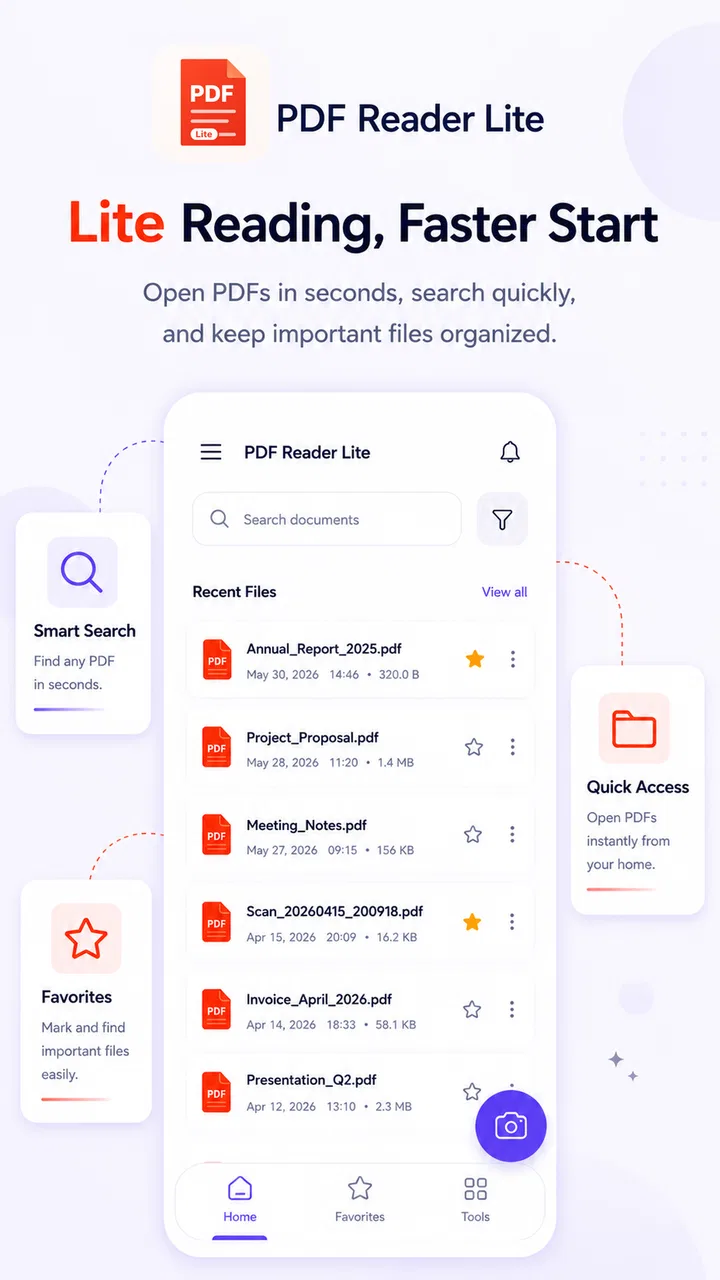
PDF Reader Lite - Fast Viewer is designed for opening and reading PDF documents on a mobile device without unnecessary complexity. During testing, it was useful for viewing ebooks, manuals, forms, receipts, study notes, and other files. Its focus is fast access and straightforward reading rather than advanced document editing or full office-suite functionality.
02Can PDF Reader Lite - Fast Viewer open large or different types of PDF files?
The app is primarily intended for standard PDF documents, including text-heavy files, scanned pages, and documents containing images. Performance can vary depending on file size, page complexity, and the device being used. Large, image-rich, or poorly optimized PDFs may take longer to load, so users with technical manuals or illustrated books should test their specific files.
03Does PDF Reader Lite - Fast Viewer work offline?
Once a PDF has been downloaded or stored on the device, the app can generally be used for offline reading, which is convenient when traveling or working without a stable connection. Internet access may still be required to obtain files from cloud services, email, or online storage. Offline availability therefore depends partly on where the document is saved.
04Does the app allow users to edit, annotate, sign, or convert PDF documents?
PDF Reader Lite - Fast Viewer is mainly a viewing application, so users should not assume it includes the complete editing tools found in premium PDF suites. Basic reading and navigation are its central purposes. Features such as text editing, annotations, electronic signatures, file conversion, or form filling may be limited, unavailable, or dependent on the app version.
05Is PDF Reader Lite - Fast Viewer free and safe to download?
The application may be available as a free download, but users should check the current store listing for advertisements, optional purchases, supported devices, and the developer’s privacy information. Downloading through the official Google Play Store or Apple App Store is the safest approach. Before opening sensitive documents, review requested permissions and avoid unofficial APK or modified versions.
Pros
- Opens common PDF files quickly
- even on older Android devices.
- Simple interface makes basic reading easy for first-time users.
- Useful search tool helps locate words or phrases in long documents.
- Supports portrait and landscape reading for greater viewing comfort.
- Small app size saves storage space compared with full-featured PDF suites.
Cons
- Limited annotation tools may disappoint users who need advanced markup features.
- Some PDFs with complex layouts may not render perfectly.
- May lack cloud integration for services such as Drive or Dropbox.
- Free version may include advertisements during regular use.
- Not designed for editing
- signing
- or converting PDF documents.

PDF Reader Lite - Fast Viewer
Gallery